Monela: Why This Spooky Typeface Might Be the Missing Piece in Your Halloween Design
Halloween is not just a holiday; for designers, small business owners, and creative hobbyists, it is a seasonal sprint. Every year, thousands of creators scramble to produce decorations, apparel, and digital assets that capture the spirit of the season. The challenge rarely lies in having ideas; it usually lies in finding the right visual language to communicate those ideas effectively. Enter Monela, a decorative font that promises to bring a unique blend of cuteness and spookiness to your projects.
At first glance, Monela appears to be another novelty typeface. However, a closer look reveals why it has gained traction among professionals who need more than just "scary" text. It is designed specifically for kid-friendly designs, balancing the eerie with the approachable. If you are looking to create outstanding Halloween-themed projects, from t-shirts to baby onesies, understanding how to leverage this specific typeface can make the difference between a generic design and a memorable one.
Understanding the Aesthetic: Cute Meets Creepy
One of the most common mistakes designers make when choosing a Halloween font is assuming that all spooky fonts must be jagged, blood-dripping, or overly aggressive. While there is certainly a market for horror-focused aesthetics, a significant portion of the Halloween demographic—particularly families with young children—prefers a softer, more playful interpretation of the holiday. This is where Monela shines.
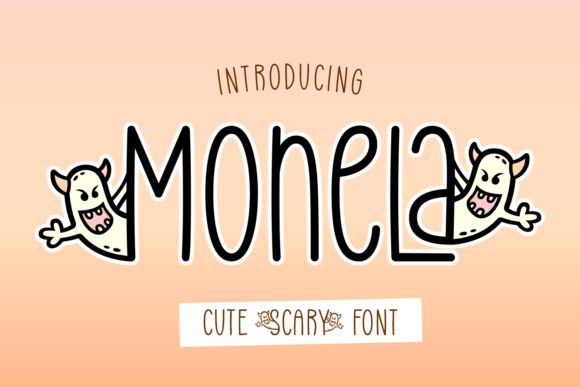
Monela features "spooky little monsters" integrated into its character set. These are not terrifying beasts but rather whimsical, original creatures that add personality without inducing fear. For educators creating classroom decorations, parents designing party invitations, or entrepreneurs selling merchandise to families, this balance is crucial. A font that is too harsh can alienate the target audience, while one that is too plain fails to evoke the festive mood. Monela hits that sweet spot, offering a thematic relevance that feels authentic rather than forced.
The Technical Hurdle: PUA Encoding Explained
While the aesthetic appeal of Monela is clear, the technical implementation is where many users stumble. Monela is PUA encoded. If you are unfamiliar with this term, it stands for Private Use Area encoding. In simple terms, this means the decorated glyphs (the characters with the little monsters attached) do not sit on standard keyboard keys like 'A', 'B', or 'C'. Instead, they occupy special codes within the font file that are not assigned to any standard character.
This distinction is critical because it affects how you access the full potential of the font. Many beginners download Monela, open their design software, and struggle to find the monster-filled letters. They might assume the font is broken or incomplete. In reality, you have to manually map these characters using the glyph panel or specific input methods provided by the font creator. Failing to understand PUA encoding can lead to frustration, wasted time, and potentially lower-quality outputs if you resort to clumsy workarounds like pasting images over text.
How to Access Decoded Glyphs Correctly
To avoid the pitfalls of PUA encoding, follow these practical steps before you start your design project:
- Use Professional Software: Applications like Adobe Illustrator, Photoshop, or Affinity Designer have robust glyph panels. Open the font, click on the glyph panel, and browse the available characters. You will see both the plain letters and the decorated versions side by side.
- Check Documentation: Most premium font packs come with a PDF guide. Look for a section titled "How to Use" or "Character Map." This guide will provide the specific Unicode codes or shortcuts needed to insert the decorated glyphs efficiently.
- Test Before Scaling: Always preview your text at the size it will be used. Decorated fonts often have intricate details that can blur or lose definition if scaled down too small on items like tiny tags or distant posters.
Common Missteps in Application
Even with the correct technical setup, applying Monela incorrectly can diminish its impact. Here are three frequent errors to watch out for.
Overuse of Decorated Characters: One of the biggest sins in typography is using every possible decorative variant in a single sentence. If every letter has a monster attached, the text becomes visually noisy and difficult to read. Reserve the decorated glyphs for headlines, key phrases, or short titles. For body text or longer descriptions, stick to the plain version of the font. This creates a hierarchy that guides the viewer’s eye and maintains readability.
Inappropriate Color Pairings: Because Monela is inherently colorful and detailed, pairing it with clashing colors can result in a muddy appearance. Avoid neon greens against bright oranges unless you are aiming for a very specific, high-contrast aesthetic. Instead, consider classic Halloween palettes like black and white, deep purple and gold, or muted pastels for a softer, modern look. Let the font’s intrinsic detail carry the weight of the design.
Neglecting Licensing for Commercial Use: If you are creating products to sell, such as t-shirts or mugs, you must ensure you have the appropriate commercial license. Many creators assume that a personal use license covers all applications. Check the EULA (End User License Agreement) carefully. Using a font without proper rights can lead to legal issues and financial penalties, which is far more stressful than any design challenge.
Expanding Your Creative Horizons
Monela is versatile beyond just traditional Halloween decor. Its unique style lends itself well to various mediums. Consider using it for:
- Apparel: Print the plain version for a subtle, textured look on dark fabrics, or use the decorated version for bold graphic tees aimed at children.
- Digital Marketing: Use Monela for social media banners or email headers during October. The quirky nature of the font grabs attention in crowded feeds.
- Educational Materials: Teachers can use the cute monster theme to make learning materials more engaging for students during the fall semester.
- Event Branding: Create cohesive branding for haunted house attractions, pumpkin carving contests, or school dances by incorporating Monela into logos and signage.
Final Thoughts on Choosing Monela
Selecting a typeface is about more than just picking something that looks cool; it is about solving a communication problem. Monela solves the problem of needing a font that is thematic yet accessible, spooky yet safe for all ages. By understanding its PUA encoding, avoiding common application errors, and respecting licensing agreements, you can harness its full potential.
Take the time to experiment with the plain and decorated variants. Mix them strategically. Test different color combinations. When done correctly, Monela will not just fill space; it will elevate your design, making your Halloween projects stand out in a crowded marketplace. Whether you are a seasoned professional or a beginner dipping your toes into design, this font offers a reliable tool for creating joyous, festive, and high-quality work.